Method: 2P Weibull distribution and Least Squares Regression#
Statistical evaluation of failure stresses.
The procedure is as follows:
Calculate the stress at failure for each specimen and sort them in increasing order of magnitude: \( \sigma_i \), where \( i \) is the rank number.
Calculate the probability of failure \( P_{f,i} \) for each measured value. Use the following estimator: \( P_{f,i} = \frac{i}{n+1} \) where \( n \) is the number of tested samples.
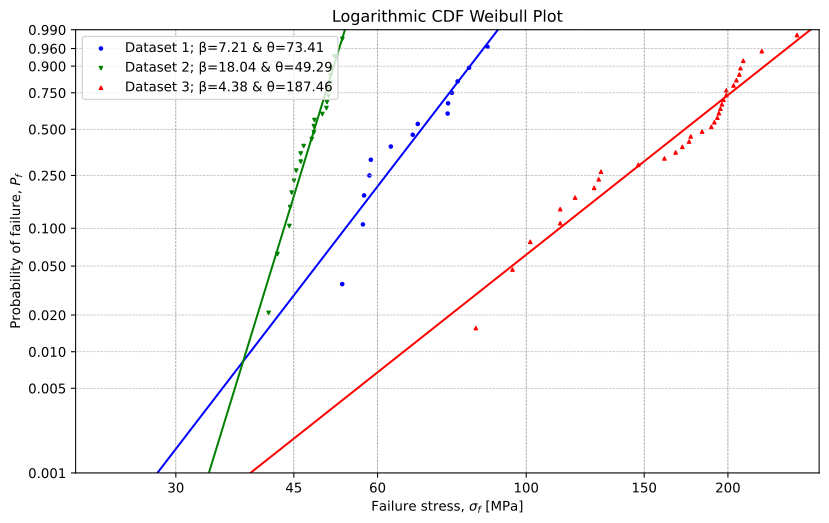
Put the Weibull distribution into linearized form. Enter the measured data into the Weibull mesh.
Fit the data by linear regression. Find the slope, the intercept, and the coefficient of determination \( R^2 \).
Determine the Weibull parameters \( \beta \) (shape parameter) and \( \theta \) (scale parameter).
Calculate the confidence interval \( CI \).
Determine the desired fractile value of the bending tensile strength \( f_y \) using the regression line and using the confidence interval. In the case of the confidence interval, the target goal seek is used.
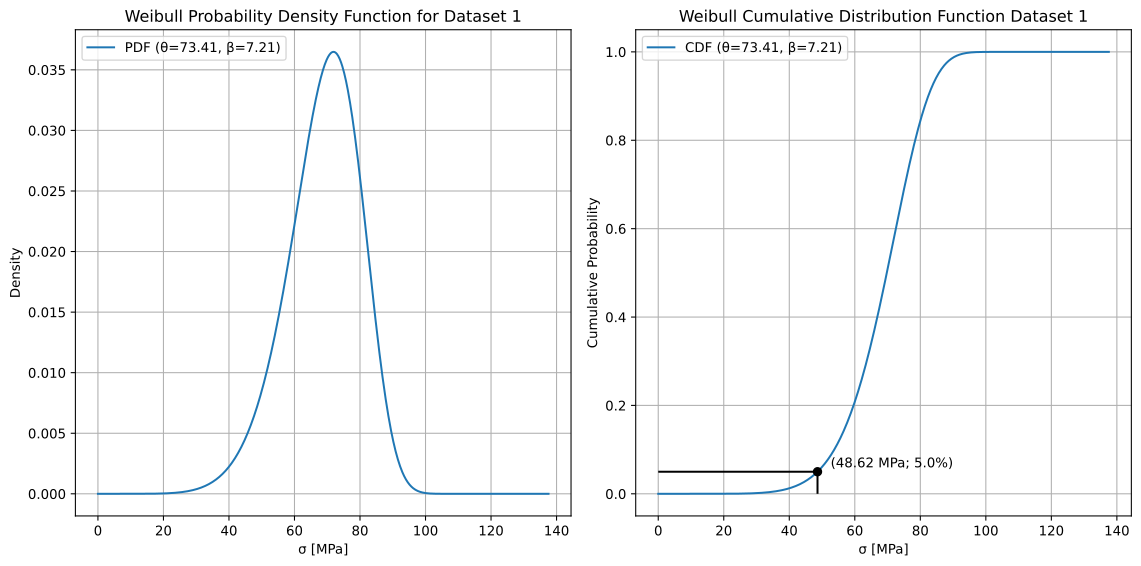
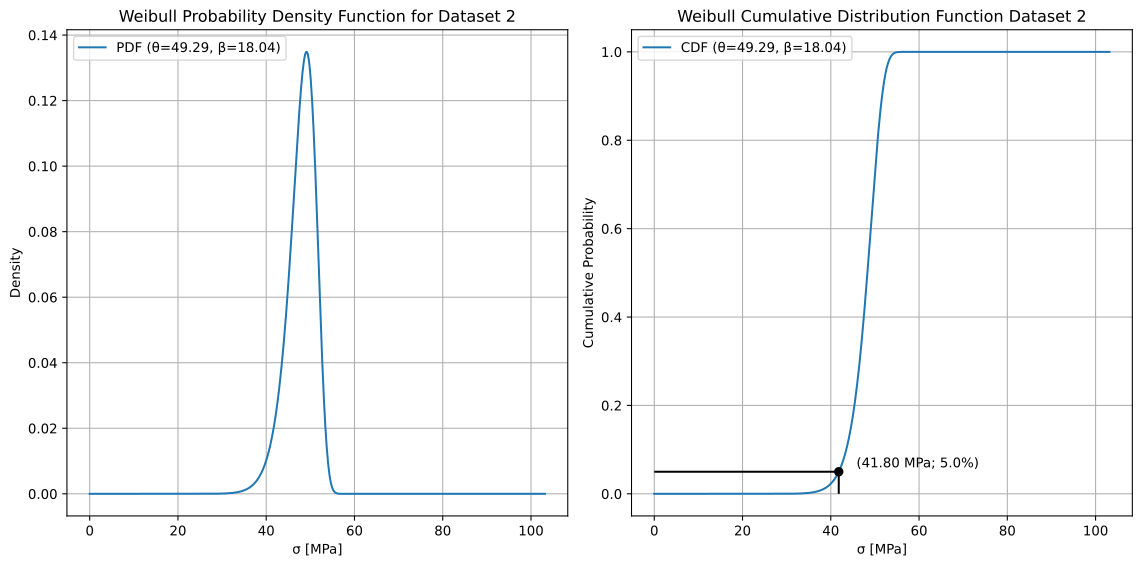
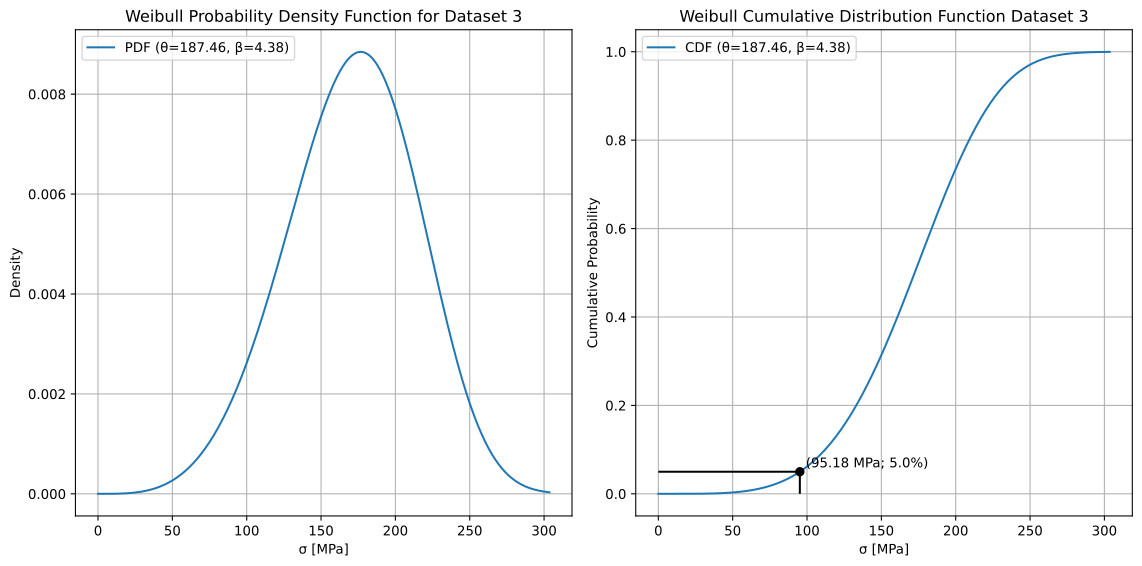
Plot the cumulative distribution function \( F(x) \) and the density function \( f(x) \).
Once the "Live Code" is enabled it is advised to "Run All" cells first to load all the necessary packages and functions.
Afterwards, any changes can be made in the input form and when the "Evaluate" button is clicked the changes are recorded.
Finally, the last two cells can be run individually by clicking on the "Run" button to produce the Weibull plots.
Show code cell source
import numpy as np
import pandas as pd
from scipy.stats import linregress, t, weibull_min
import matplotlib.pyplot as plt
from matplotlib.ticker import ScalarFormatter
from matplotlib.ticker import FuncFormatter
from scipy.optimize import fsolve
import ipywidgets as widgets
from IPython.display import display, HTML, clear_output
%config InlineBackend.figure_format = 'svg'
Definition of useful functions:#
Convert failure stress to equivalent failure stress for a constant load given a reference time period.
Calculation of standard error.
Confidence interval calculation
Weibull pdf and cdf distributions
Calculation of Anderson Darling goodness of fit metric \( p_{AD} \)
Show code cell source
def equivalent_failure_stress(sigma_f, t_f, t_eq=60, n=16):
    """
    Convert failure stress to equivalent failure stress for a constant load.

    Parameters:
    sigma_f (float): Original failure stress.
    t_f (float): Actual failure time.
    t_eq (int): Reference time period (in seconds). Default is 60s.
    n (int): Exponent value. Default is 16.

    Returns:
    float: Equivalent failure stress for a given reference period.
    """
    try:
        if t_eq not in [1, 3, 5, 60]:
            raise ValueError("Reference time period must be one of: 1, 3, 5, or 60 seconds.")
        sigma_f_eq = sigma_f * (t_f / (t_eq*(n+1))) ** (1 / n)
        return sigma_f_eq

    except ValueError as e:
        print(e)
        return None


def steyx(x, y):
    n = len(x)
    if len(y) != n:
        raise ValueError("x and y must have the same length")

    x_mean = np.mean(x)
    y_mean = np.mean(y)

    # Calculate the slope and intercept
    slope = np.sum((x - x_mean) * (y - y_mean)) / np.sum((x - x_mean) ** 2)
    intercept = y_mean - slope * x_mean

    # Calculate predicted y-values
    y_pred = slope * x + intercept

    # Calculate standard error
    se = np.sqrt(np.sum((y - y_pred) ** 2) / (n - 2))
    return se

# Define confidence function
def CI(x):
    return t_value * se * np.sqrt(1/n + (x - mean_ln_stress)**2 / np.sum((ln_stress - mean_ln_stress)**2))

# Define the function of the upper confidence interval
def f_upper(x):
    return slope*x + intercept - CI(x)

# Define the function of the lower confidence interval
def f_lower(x):
    return slope*x + intercept + CI(x)

# Define a function that subtracts the target value
def goal_seek_function_CI_upper(x):
    return f_upper(x) - target_value

# Define a function that subtracts the target value
def goal_seek_function_CI_lower(x):
    return f_lower(x) - target_value

# Weibull PDF
def weibull_pdf(x, beta, lambda_):
    return (lambda_ / beta) * (x / beta)**(lambda_ - 1) * np.exp(-(x / beta)**lambda_)

# Weibull CDF
def weibull_cdf(x, beta, lambda_):
    return 1 - np.exp(-(x / beta)**lambda_)

def goodness_of_fit_test_weibull(data, beta, theta):
    # Fit the Weibull distribution using the provided parameters
    fitted_dist = weibull_min(c=beta, scale=theta)

    # Sort the data
    data_sorted = np.sort(data)
    n = len(data_sorted)

    # Calculate the cumulative distribution function values of the fitted distribution
    cdf_vals = fitted_dist.cdf(data_sorted)

    # Compute the AD^2 component
    AD2 = -n - np.sum((2 * np.arange(1, n+1) - 1) / n *
                      (np.log(cdf_vals) + np.log(1 - cdf_vals[::-1])))

    # Calculate AD*
    AD_star = (1 + 0.2 / np.sqrt(n)) * AD2

    # Compute the p-value using the equation provided
    p_AD = 1 / (1 + np.exp(-0.1 + 1.24 * np.log(AD_star) + 4.48 * AD_star))

    return p_AD
Interactive Data Input#
This widget allows users to input datasets, set analysis parameters, and optionally convert failure stress values.
What can be done:#
Choose the number of datasets (default: 3).
Enter dataset names and values (comma-separated).
Set target values:
stress fractile (default: 5%)
confidence interval: Enter the alpha value. (default: 95%)
x-limits (default: lower limit = min_stress_level - 20, upper limit =max_stress_level + 20)
Select a probability estimator:
(i - 0.5) / n (Hazen’s probability estimator)
i / (n + 1) (Mean rank probability estimator)
Convert failure stress (optional):
Toggle conversion of failure stress to equivalent failure stress for a selected reference period ON/OFF, by clicking Yes/No respectively.
Enter time-to-failure values.
Choose a reference time period (1s, 3s, 5s, 60s).
How It Works:#
1️⃣ Click “Confirm” to generate input fields for the failure stress datasets.
2️⃣ (Optional) Click “Yes” and enter the time-to-failure values corresponding to each failure stress dataset.
3️⃣ Enter values and click “Evaluate” to process the data.
Show code cell source
# Create an HTML widget for instructions
instructions = widgets.HTML(
    value="""
    <p style="font-size: 16px">Enter the data separated by commas, with decimal point (e.g. "1.44, 2.33, 4.22, 3.01,...")</p>
    <b style="font-size: 16px">Data protection declaration: The data entered will not be saved or transmitted over the network.</b>
    """
)

blank_space = widgets.HTML(
    value="""<br>"""
)


# Widget to ask user how many datasets they want
num_datasets_input = widgets.IntText(
    value=3,  # Default value
    description="Number of Datasets:",
    style={'description_width': 'auto'},
    layout=widgets.Layout(width='250px')
)

# Button to confirm number of datasets
confirm_button = widgets.Button(description="Confirm")

# Container to hold dataset input fields dynamically
dataset_container = widgets.VBox()

# Container for target values and x limits
target_inputs = widgets.VBox()

# Toggle button for method selection
method_toggle = widgets.ToggleButtons(
    options=["(i-0.5)/n", "i/(n+1)"],
    description="Probability Estimator:",
    style={'description_width': 'auto'}
)

# Button to evaluate inputs
evaluate_button = widgets.Button(description="Evaluate", disabled=True)

# Output container for display
output = widgets.Output()

# Variables to hold dynamic widgets
dataset_name_inputs = []  # List to hold dataset name input widgets
dataset_value_inputs = []  # List to hold dataset text input widgets
time_to_failure_inputs = [] # List to hold time to failure input widgets

# Conversion Widget
convert_toggle = widgets.ToggleButtons(
    options=["No", "Yes"],
    description="Convert to equivalent constant failure stress for a reference time period?",
    style={'description_width': 'auto'},
)

# Dropdown for conversion factor
conversion_factor_dropdown = widgets.Dropdown(
    options=[1, 3, 5, 60],
    description="Select reference time period[s]:",
    style={'description_width': 'auto'},
    value=60 # Set the default value to 60 seconds
)

additional_conversion_inputs = widgets.VBox()
# Function to show/hide dropdown based on toggle selection
def handle_conversion(change):
    global time_to_failure_inputs
    if change['new'] == "Yes":
        conversion_factor_dropdown.layout.display = "block"
        num_datasets = num_datasets_input.value
        time_to_failure_inputs = []

        conversion_layout = []
        for i in range(num_datasets):
            time_period_input = widgets.Textarea(
            description=f"Time to failure {i+1}:",
            placeholder="Enter values separated by commas...",
            layout=widgets.Layout(width="500px", height="50px"),
            style={'description_width': 'auto'}
        )
            time_to_failure_inputs.append(time_period_input)
            conversion_layout.append(time_period_input)

        # Update the additional inputs container with the new input fields
        additional_conversion_inputs.children = conversion_layout
    else:
        conversion_factor_dropdown.layout.display = "none"
        additional_conversion_inputs.children = []

convert_toggle.observe(handle_conversion, names="value")

# Hide conversion factor dropdown initially
conversion_factor_dropdown.layout.display = "none"

# Function to generate input fields dynamically
def generate_inputs():
    global dataset_name_inputs, dataset_value_inputs

    num_datasets = num_datasets_input.value
    dataset_name_inputs = []
    dataset_value_inputs = []

    # Lists to arrange input areas
    dataset_layout = []

    for i in range(num_datasets):

        # Dataset Name Input
        dataset_name = widgets.Text(
            description=f"Name {i+1}:",
            placeholder=f"Dataset {i+1}",
            layout=widgets.Layout(width="250px"),
            style={'description_width': 'auto'}
        )
        dataset_name_inputs.append(dataset_name)

        # Create dataset input field (values)
        dataset_text = widgets.Textarea(
            description=f"Values {i+1}:",
            placeholder="Enter values separated by commas...",
            layout=widgets.Layout(width="500px", height="50px"),
            style={'description_width': 'auto'}
        )
        dataset_value_inputs.append(dataset_text)

        # Add the widgets to the layout
        dataset_layout.append(widgets.HBox([dataset_name, dataset_text]))

    # Create input fields for Target Stress Fractile and Confidence Interval
    target_g_text = widgets.FloatText(
        description="Target stress fractile:",
        value=0.05, layout=widgets.Layout(width="300px"),
        style={'description_width': 'auto'}
    )

    target_alpha_text = widgets.FloatText(
        description="Target confidence interval:",
        value=0.10, layout=widgets.Layout(width="300px"),
        style={'description_width': 'auto'}
    )

    # Input fields for x limits
    lower_x_limit_text = widgets.FloatText(
        description="Lower x limit:",
        layout=widgets.Layout(width="300px"),
        style={'description_width': 'auto'}
    )

    upper_x_limit_text = widgets.FloatText(
        description="Upper x limit:",
        layout=widgets.Layout(width="300px"),
        style={'description_width': 'auto'}
    )

    # Update the target inputs container
    target_inputs.children = [target_g_text, target_alpha_text, lower_x_limit_text, upper_x_limit_text]

    # Update the dataset container with new input fields
    dataset_container.children = dataset_layout

    # Enable the evaluate button
    evaluate_button.disabled = False

def on_confirm_button_click(event):
    generate_inputs()
# Attach event to confirm button
confirm_button.on_click(on_confirm_button_click)

# Function to evaluate inputs
def evaluate(event):
    with output:
        clear_output()
        global stress_values, target_P_f, target_alpha, lower_x_limit, upper_x_limit, selected_estimator, convert_to_equivalent_stress, reference_period, time_to_failure, equivalent_stress_values
        stress_values = {}
        time_to_failure = {}
        equivalent_stress_values = {}

        try:
            # Extract dataset values
            for i in range(len(dataset_value_inputs)):
                dataset_name = dataset_name_inputs[i].value.strip() or f"Dataset {i+1}"
                try:
                    data_values = [float(x.strip()) for x in dataset_value_inputs[i].value.split(",") if x.strip()]
                except ValueError as parse_error:
                    print(f"Error parsing dataset values for '{dataset_name}': {parse_error}\n")
                    continue


                stress_values[dataset_name] = np.array(data_values)

            # Extract target values and x limits
            target_P_f = float(target_inputs.children[0].value)
            target_alpha = float(target_inputs.children[1].value)
            lower_x_limit = float(target_inputs.children[2].value)
            upper_x_limit = float(target_inputs.children[3].value)

            # Show selected method
            selected_estimator = method_toggle.value
            print(f"Selected Probility Estimator: {selected_estimator}")

            # Display results
            for dataset_name in stress_values.keys():
                print(f"{dataset_name}; n = {len(stress_values[dataset_name])} samples: {stress_values[dataset_name]}")

            print(f"\nTarget stress fractile: {target_P_f * 100}%")
            print(f"Target confidence interval: {int((1 - 0.5*target_alpha) * 100)}%")

            if lower_x_limit != 0 or upper_x_limit != 0:
                print(f"Lower x limit: {lower_x_limit}, Upper x limit: {upper_x_limit}")
            else:
                print(f"Default values for Lower x limit and Upper x limit.")

            # Handle conversion
            convert_to_equivalent_stress = convert_toggle.value
            reference_period = conversion_factor_dropdown.value if convert_to_equivalent_stress == "Yes" else None

            if convert_to_equivalent_stress == "Yes":
                print(f"\nConversion of failure stress: Yes, Reference time period [s]: {reference_period}")
                # Extract dataset values
                for i in range(len(time_to_failure_inputs)):
                    dataset_name = dataset_name_inputs[i].value.strip() or f"Dataset {i+1}"
                    try:
                        time_to_failure_values = [float(x.strip()) for x in time_to_failure_inputs[i].value.split(",") if x.strip()]
                    except ValueError as ttf_error:
                        print(f"Error parsing time-to-failure values for '{dataset_name}': {ttf_error}")
                        continue
                    # Handle data length mismatch
                    try:
                        if len(stress_values[dataset_name]) != len(time_to_failure_values):
                            raise ValueError(f"Error: Mismatch in data lengths for {dataset_name}: "
                                             f"{len(data_values)} data values vs {len(time_to_failure_values)} time-to-failure values.")
                    except ValueError as length_error:
                        print(f"\n{length_error}")
                        continue

                    time_to_failure[dataset_name] = np.array(time_to_failure_values)
                    print(f"{dataset_name}; n = {len(time_to_failure[dataset_name])}; Time to failure values[s]: {time_to_failure_values}")

                    stress_data_eq = equivalent_failure_stress(stress_values[dataset_name],time_to_failure[dataset_name],reference_period)
                    equivalent_stress_values[dataset_name] = np.around(stress_data_eq,2)
                    print(f"The equivalent failure stress for {reference_period} seconds is {np.around(stress_data_eq,2)}")


            else:
                print("Conversion of failure stress: No")

        except ValueError:
            print("\n")
            print("Error: Please enter valid comma-separated numbers or check your input.")

# Attach event to evaluate button
evaluate_button.on_click(evaluate)

# Arrange and display widgets
display(instructions, widgets.VBox([num_datasets_input, confirm_button, dataset_container, target_inputs, method_toggle,convert_toggle,conversion_factor_dropdown,additional_conversion_inputs, evaluate_button, output]))
Start of Statistical evaluation#
Show code cell source
if 'stress_values' not in globals() or 'stress_values' not in locals():
    print("Please enter all the necessary input data in the above input fields!")
else:
    plt.figure(figsize=(10, 6))
    i = 0;
    min_stress_data = 100000
    max_stress_data = -10000

    # Initialize an empty dictionary to store the scale & shape value of a Weibull distribution corresponding to each dataset.
    Weibull_distribution_parameters = {}
    Regression_line_parameters = {}
    for dataset, stress_data in stress_values.items():

        if stress_data.size > 0 and np.any(stress_data != 0):
            if convert_to_equivalent_stress == "Yes" and len(time_to_failure) > 0:
                stress_data = equivalent_stress_values[dataset]

            # Sort the stress in increasing order
            sorted_stress = np.sort(stress_data)

            # Calculate probability of failure (P_f,i)
            n = len(sorted_stress)

            if selected_estimator == "(i-0.5)/n":
                # Apply Hazen’s probability estimator
                P_f = np.array([(i-0.5) / (n) for i in range(1,n+1)])
            else:
                # Apply mean rank probability estimator
                P_f = np.array([(i) / (n+1) for i in range(1,n+1)])

            # Linearize the Weibull distribution
            ln_stress = np.log(sorted_stress)

            ln_ln_Pf = np.log(np.log(1 / (1 - P_f)))

            # Perform linear regression
            slope, intercept, r_value, p_value, std_error = linregress(ln_stress, ln_ln_Pf)
            R_squared = r_value**2
            std_err = steyx(ln_stress, ln_ln_Pf)

            # Calculate the standard error
            se = std_err

            # Calculate the t-value for 95% confidence
            alpha = target_alpha
            t_value = t.ppf(1 - alpha/2, df=n-2)

            # Calculate the confidence interval
            mean_ln_stress = np.mean(ln_stress)

            C = t_value * se * np.sqrt(1/n + (ln_stress - mean_ln_stress)**2 / np.sum((ln_stress - mean_ln_stress)**2))

            # Weibull Parameters estimation
            shape = slope                    # beta
            scale = np.exp(-intercept/slope) # theta
            Weibull_distribution_parameters[dataset] = (scale,shape)
            Regression_line_parameters[dataset] = (slope, intercept, R_squared)


            # Plot with confidence interval
            # List of marker symbols to cycle through
            # Uncomment more symbols for larger number of datasets
            markers = [
                #'.',  # Point
                #',',  # Pixel
                'o',  # Circle
                'v',  # Triangle down
                '^',  # Triangle up
                #'<',  # Triangle left
                #'>',  # Triangle right
                #'1',  # Tri-down
                #'2',  # Tri-up
                #'3',  # Tri-left
                #'4',  # Tri-right
                's',  # Square
                #'p',  # Pentagon
                #'*',  # Star
                #'h',  # Hexagon 1
                #'H',  # Hexagon 2
                #'+',  # Plus
                #'x',  # X
                'D',  # Diamond
                #'d',  # Thin diamond
                #'|',  # Vertical line
                #'_',  # Horizontal line
            ]
            # List of line styles to cycle through
            line_styles = [
                '-',    # Solid line
                '--',   # Dashed line
                '-.',   # Dash-dot line
                ':',    # Dotted line
                # Uncomment more styles for larger number of datasets
                # '',     # No line
            ]

            # List of colors to cycle through
            colors = [
                'b',    # Blue
                'g',    # Green
                'r',    # Red
                'c',    # Cyan
                'm',    # Magenta
                'y',    # Yellow
                'k',    # Black
                # Uncomment more colors for larger number of datasets
                # 'w',   # White
                # '#1f77b4', # Light blue
                # '#ff7f0e', # Orange
                # '#2ca02c', # Light green
                # '#d62728', # Light red
                # '#9467bd', # Purple
            ]
            # Select marker symbol from the list
            marker = markers[i % len(markers)]
            # Select line style and color from the lists
            line_style = line_styles[i % len(line_styles)]
            color = colors[i % len(colors)]

            # Creating a range of x values

            if min(stress_data) < min_stress_data:
                min_stress_data = min(stress_data)
            if max(stress_data) > max_stress_data:
                max_stress_data = max(stress_data)

            # Equation of the line in the form y = mx + c
            # Use y1 = m * x1 + c to find c
            x = np.linspace(0,1000,1000)
            y = weibull_cdf(x, scale, shape)
            #fitted_line = np.log(np.log(1 / (1 - (slope * x + intercept))))
            #slope, intercept, r_value, p_value, std_error = linregress(np.log(stress_data), np.log(P_f))
            # if display_confidence_intervals_ON:
            #     plt.fill_between(sorted_stress, slope * sorted_stress + intercept - C, slope * sorted_stress + intercept + C, color='grey', alpha=0.3, label=f'{int((1-target_alpha/2)*100)}% Confidence interval')
            plt.scatter(sorted_stress, P_f, color= color, s=6, label=f'{dataset}; \u03B2={shape:.2f} & \u03B8={scale:.2f}',marker = marker)
            plt.plot(x, y, color=color)

            # Determine the x% fractile
            Pf_x = target_P_f
            ln_ln_Pf_x = np.log(np.log(1 / (1 - Pf_x)))
            x_5 = (ln_ln_Pf_x - intercept) / slope
            stress_x_percentile = round(np.exp(x_5),2)

            # Set the target value
            # Determine the x% fractile
            target_value = np.log(np.log(1 / (1 - Pf_x)))

            # Initial guess
            initial_guess = 3.0

            # Use fsolve to perform the goal seek for the upper value of the confidence interval
            solution_CI_upper = fsolve(goal_seek_function_CI_upper, initial_guess)
            # Use fsolve to perform the goal seek for the lower value of the confidence interval
            solution_CI_lower = fsolve(goal_seek_function_CI_lower, initial_guess)

            # Output the solution
            #print(f"The value of x that makes P_f(x) = {target_value} is: {solution_CI_upper[0]}")
            #print(f"The value of x that makes P_f(x) = {target_value} is: {solution_CI_lower[0]}")
            stress_x_percentile_CI_upper = round(np.exp(solution_CI_upper[0]),2)
            stress_x_percentile_CI_lower = round(np.exp(solution_CI_lower[0]),2)

            # print(f"Selected {target_P_f*100}% Fractile Stress: {stress_x_percentile:.2f} MPa")
            # print(f"Selected {int((1-target_alpha/2)*100)}% Confidence Interval of {target_P_f*100}% Fractile: ({stress_x_percentile_CI_lower:.2f}, {stress_x_percentile_CI_upper:.2f}) MPa")
            # Add regression equation and R-squared below the figure
            # regression_text = f"y = {slope:.2f}x {'+' if intercept > 0 else '-'} {abs(intercept):.2f}; $R^2$ = {r_value**2:.3f}"
            # stress_text = f"{target_P_f*100}%  Fractile Stress: {stress_x_percentile:.2f} MPa\n" \
            #               f"{int((1-target_alpha/2)*100)}% Confidence Interval of {target_P_f*100}% Fractile: ({stress_x_percentile_CI_lower:.2f}, {stress_x_percentile_CI_upper:.2f}) MPa"
            # plt.figtext(0.5, -0.08 - i * 0.11,
            #     f"Regression line for {dataset}: {regression_text}\n {stress_text}",
            #     wrap=True, horizontalalignment='center', fontsize=10,
            #     bbox=dict(facecolor='white', edgecolor='black', boxstyle='round,pad=0.2'))
            i += 1

            # Determine the 0.8% fractile
            Pf_08 = 0.008
            ln_ln_Pf_08 = np.log(np.log(1 / (1 - Pf_08)))
            x_08 = (ln_ln_Pf_08 - intercept) / slope
            stress_08_percentile = round(np.exp(x_08),2)
            target_value = np.log(np.log(1 / (1 - Pf_08)))

            # Initial guess
            initial_guess = 3.0

            # Use fsolve to perform the goal seek for the upper value of the confidence interval
            solution_CI_upper = fsolve(goal_seek_function_CI_upper, initial_guess)
            # Use fsolve to perform the goal seek for the lower value of the confidence interval
            solution_CI_lower = fsolve(goal_seek_function_CI_lower, initial_guess)

            stress_08_percentile_CI_upper = round(np.exp(solution_CI_upper[0]),2)
            stress_08_percentile_CI_lower = round(np.exp(solution_CI_lower[0]),2)


            # Determine the 5% fractile
            Pf_5 = 0.05
            ln_ln_Pf_5 = np.log(np.log(1 / (1 - Pf_5)))
            x_5 = (ln_ln_Pf_5 - intercept) / slope
            stress_5_percentile = round(np.exp(x_5),2)
            target_value = np.log(np.log(1 / (1 - Pf_5)))

            # Initial guess
            initial_guess = 3.0

            # Use fsolve to perform the goal seek for the upper value of the confidence interval
            solution_CI_upper = fsolve(goal_seek_function_CI_upper, initial_guess)
            # Use fsolve to perform the goal seek for the lower value of the confidence interval
            solution_CI_lower = fsolve(goal_seek_function_CI_lower, initial_guess)

            stress_5_percentile_CI_upper = round(np.exp(solution_CI_upper[0]),2)
            stress_5_percentile_CI_lower = round(np.exp(solution_CI_lower[0]),2)
            # Determine the 50% fractile
            Pf_50 = 0.5
            ln_ln_Pf_50 = np.log(np.log(1 / (1 - Pf_50)))
            x_50 = (ln_ln_Pf_50 - intercept) / slope
            stress_50_percentile = round(np.exp(x_50),2)
            target_value = np.log(np.log(1 / (1 - Pf_50)))

            # Initial guess
            initial_guess = 3.0

            # Use fsolve to perform the goal seek for the upper value of the confidence interval
            solution_CI_upper = fsolve(goal_seek_function_CI_upper, initial_guess)
            # Use fsolve to perform the goal seek for the lower value of the confidence interval
            solution_CI_lower = fsolve(goal_seek_function_CI_lower, initial_guess)

            stress_50_percentile_CI_upper = round(np.exp(solution_CI_upper[0]),2)
            stress_50_percentile_CI_lower = round(np.exp(solution_CI_lower[0]),2)

            # Calculate the mean of the data
            mean = np.mean(stress_data)

            # Calculate the standard deviation of the data for a sample
            std_dev = np.std(stress_data, ddof=1)  # Use ddof=1 for sample standard deviation or ddof=0  for population standard deviation

            # Calculate the coefficient of variation
            coefficient_of_variation = (std_dev / mean) * 100
            p_value = goodness_of_fit_test_weibull(sorted_stress, shape, scale)
            # Define the data for the table containing integers
            table_data1 = [
                ("Fractile [%]", "Stress [MPa]", "95% CI lower [MPa]", "95% CI upper [MPa]"),
                ("0.8%", stress_08_percentile, stress_08_percentile_CI_lower, stress_08_percentile_CI_upper),                     # Row 1
                ("5%", stress_5_percentile,stress_5_percentile_CI_lower,stress_5_percentile_CI_upper),                            # Row 2
                ("50%", stress_50_percentile,stress_50_percentile_CI_lower,stress_50_percentile_CI_upper),                        # Row 3
                (f"Selected {target_P_f*100}%", stress_x_percentile,stress_x_percentile_CI_lower,stress_x_percentile_CI_upper)    # Row 4
            ]

            # Generate HTML for the table
            html_content1 = f"""
            <table border='1' style='border-collapse: collapse;'>
                <caption style='caption-side: top; font-weight: bold;'>{dataset} (n={n})</caption>
            """
            for row in table_data1:
                html_content1 += "<tr>"
                for item in row:
                    html_content1 += f"<td style='padding: 5px;'>{item}</td>"
                html_content1 += "</tr>"
            html_content1 += "</table>"

             # Define the data for the table containing integers
            table_data2 = [
                ("Min Stress [MPa]", "Max Stress [MPa]", " Mean Stress [MPa]", "Coeff. of variation [%]","Goodness of fit, p<sub>AD</sub>"),
                (round(min(sorted_stress),2), round(max(sorted_stress),2), round(np.mean(sorted_stress),2), round(coefficient_of_variation,2), round(p_value*100,2)),
            ]

            # Generate HTML for the table
            html_content2 = f"""
            <table border='1' style='border-collapse: collapse;'>
                <caption style='caption-side: top; font-weight: bold;'>{dataset} (n={n})</caption>
            """
            for row in table_data2:
                html_content2 += "<tr>"
                for item in row:
                    html_content2 += f"<td style='padding: 5px;'>{item}</td>"
                html_content2 += "</tr>"
            html_content2 += "</table>"

            # Add regression equation and R-squared below table 2
            slope = Regression_line_parameters[dataset][0]
            intercept = Regression_line_parameters[dataset][1]
            R_squared = Regression_line_parameters[dataset][2]
            html_content3 = f"""
            <p>Regression line for "<strong>{dataset}</strong>" (<strong>n={n}</strong>) is: <strong>y = {slope:.2f}x {'+' if intercept > 0 else '-'} {abs(intercept):.2f}; R<sup>2</sup>= {R_squared:.3f}</strong></p>
            """

            # Display the table using HTML
            display(HTML(html_content1),HTML(html_content2),HTML(html_content3))

    plt.xlabel(f'Failure stress, $\u03C3_f$ [MPa]')
    plt.ylabel('Probability of failure, $P_f$')
    plt.title('Logarithmic CDF Weibull Plot')

    probs = [0.001, 0.005, 0.01, 0.02, 0.05, 0.1, 0.25, 0.50, 0.75, 0.90, 0.96, 0.99]
    # Draw vertical lines
    xticks = [ 5, 10, 15, 20, 30, 45, 60, 100, 150, 200]
    vertical_lines = xticks
    for x in vertical_lines:
        plt.axvline(x=x, color='grey', alpha = 0.5, linestyle='--', linewidth=0.5)

    # Set custom y-ticks and log scale
    SMALL = 1.0e-20    # attempt to protect against invalid arguments to log
    def forwardY( p ):
        return np.log(np.fmax(SMALL, -np.log(np.fmax(SMALL,1-p))))

    def inverseY( q ):
        return 1 - np.exp(-np.exp(q))

    def forwardX(x):
        return np.log(np.fmax(SMALL,x))

    def inverseX(y):
        return np.exp(y)

    plt.ylim(bottom=0.001, top=0.99)
    plt.xscale('function', functions=(forwardX,inverseX))
    plt.yscale('function', functions=(forwardY,inverseY))
    plt.yticks(probs)

    # Set x-ticks and their visible labels
    plt.xticks(vertical_lines, [str(v) for v in vertical_lines])
    if lower_x_limit != 0 or upper_x_limit != 0:
        plt.xlim(left=lower_x_limit, right=upper_x_limit)
    else:
        plt.xlim(left=min_stress_data-20, right=max_stress_data+20)

    # Get handles and labels, then filter to make them unique
    handles, labels = plt.gca().get_legend_handles_labels()
    unique_labels_set = set()
    unique_handles_labels = []

    for handle, label in zip(handles, labels):
        if label not in unique_labels_set:
            unique_handles_labels.append((handle, label))
            unique_labels_set.add(label)

    # Construct separate lists for handles and labels, and position the legend
    if unique_handles_labels:
        unique_handles, unique_labels = zip(*unique_handles_labels)
        plt.legend(unique_handles, unique_labels, loc='upper left')
    #plt.grid(True)
    plt.grid(True, which='both', linestyle='--', linewidth=0.5)
    plt.show()
| Fractile [%] | Stress [MPa] | 95% CI lower [MPa] | 95% CI upper [MPa] |
| 0.8% | 37.59 | 32.91 | 41.28 |
| 5% | 48.62 | 44.91 | 51.48 |
| 50% | 69.77 | 67.85 | 71.88 |
| Selected 5.0% | 48.62 | 44.91 | 51.48 |
| Min Stress [MPa] | Max Stress [MPa] | Mean Stress [MPa] | Coeff. of variation [%] | Goodness of fit, pAD |
| 53.14 | 87.54 | 68.77 | 16.08 | 22.83 |
Regression line for "Dataset 1" (n=14) is: y = 7.21x - 30.96; R2= 0.892
| Fractile [%] | Stress [MPa] | 95% CI lower [MPa] | 95% CI upper [MPa] |
| 0.8% | 37.72 | 36.97 | 38.38 |
| 5% | 41.8 | 41.3 | 42.25 |
| 50% | 48.29 | 48.05 | 48.55 |
| Selected 5.0% | 41.8 | 41.3 | 42.25 |
| Min Stress [MPa] | Max Stress [MPa] | Mean Stress [MPa] | Coeff. of variation [%] | Goodness of fit, pAD |
| 41.26 | 53.17 | 47.87 | 6.69 | 22.66 |
Regression line for "Dataset 2" (n=24) is: y = 18.04x - 70.32; R2= 0.958
| Fractile [%] | Stress [MPa] | 95% CI lower [MPa] | 95% CI upper [MPa] |
| 0.8% | 62.35 | 57.73 | 66.67 |
| 5% | 95.18 | 90.86 | 99.16 |
| 50% | 172.42 | 169.07 | 175.91 |
| Selected 5.0% | 95.18 | 90.86 | 99.16 |
| Min Stress [MPa] | Max Stress [MPa] | Mean Stress [MPa] | Coeff. of variation [%] | Goodness of fit, pAD |
| 84.1 | 253.6 | 170.49 | 24.87 | 2.44 |
Regression line for "Dataset 3" (n=32) is: y = 4.38x - 22.94; R2= 0.950
Plot the cumulative distribution function \( F(x) \) and the density function \( f(x) \).#
Show code cell source
if 'stress_values' not in globals() or 'stress_values' not in locals():
    print("Please enter all the necessary input data in the above input fields!")
else:
    for dataset, stress_data in stress_values.items():
            if stress_data.size > 0 and np.any(stress_data != 0):
                if convert_to_equivalent_stress == "Yes" and len(time_to_failure) > 0:
                    stress_data = equivalent_stress_values[dataset]
                # Creating a range of x values
                x = np.linspace(0,max(stress_data)+50,1000)
                # Calculate PDF and CDF
                pdf_values = weibull_pdf(x, Weibull_distribution_parameters[dataset][0], Weibull_distribution_parameters[dataset][1])
                cdf_values = weibull_cdf(x, Weibull_distribution_parameters[dataset][0], Weibull_distribution_parameters[dataset][1])
                # Calculate the x% fractile
                target_percentile = 1 - target_P_f
                x_percentile = Weibull_distribution_parameters[dataset][0] * (-np.log(target_percentile))**(1/Weibull_distribution_parameters[dataset][1])
                # Plotting
                plt.figure(figsize=(12, 6))
                # Plot PDF
                plt.subplot(1, 2, 1)
                plt.plot(x, pdf_values, label=f"PDF (\u03B8={Weibull_distribution_parameters[dataset][0]:.2f}, \u03B2={Weibull_distribution_parameters[dataset][1]:.2f})")
                plt.title(f'Weibull Probability Density Function for {dataset}')
                plt.xlabel('\u03C3 [MPa]')
                plt.ylabel('Density')
                plt.grid(True)
                plt.legend(loc='upper left')
                # Plot CDF
                plt.subplot(1, 2, 2)
                plt.plot(x, cdf_values, label=f"CDF (\u03B8={Weibull_distribution_parameters[dataset][0]:.2f}, \u03B2={Weibull_distribution_parameters[dataset][1]:.2f})")
                plt.hlines(target_P_f, 0, x_percentile, color='black', linestyle='-')
                plt.vlines(x_percentile, 0, target_P_f, color='black', linestyle='-')
                # Add a circular marker at the 5% fractile
                plt.scatter([x_percentile], [target_P_f], color='black', zorder=5)
                # Annotate the 5% fractile
                plt.text(x_percentile + 4, target_P_f + 0.01, f'({x_percentile:.2f} MPa; {target_P_f*100}%)', fontsize=10)
                plt.title(f'Weibull Cumulative Distribution Function {dataset}')
                plt.xlabel('\u03C3 [MPa]')
                plt.ylabel('Cumulative Probability')
                plt.grid(True)
                plt.legend(loc='upper left')
                plt.tight_layout()
                plt.show()